
HeatLog
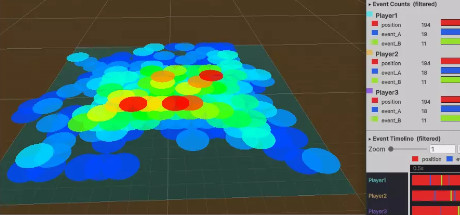
Save and visualize spatial log data directly in your Unity3D Editor. Track player and NPC movement, actions, and hotspots - camping spots, stuck points, areas where players die often - then dig into event counts and timelines in the built-in Analytics tab.
What it does
One-line logging
Log positions, entity actions, and custom events with a single call to HeatmapEvent.Log().
In-editor heatmap viewer
Load any saved session from the Heatmap Viewer & Analytics window and visualize it directly in the Scene view.
Three overlay modes
Switch between Heatmaps, per-entity colors, or per-label colors, with adjustable cell size and styling.
Built-in analytics
An Analytics tab shows event counts and a timeline chart, with zoom, hover and click for details.
JSON or binary logs
Save sessions as readable .json or compact .heatlog files, buffered or streaming, wherever you choose.
Full C# source
Included source lets you extend recording, storage and visualization to fit your project.
